FRP Manager

v0.0.53

Run frp from your browser

FRP Manager is a self-hosted web panel for frps and frpc. Open ports, filter who reaches them, read the logs and update frp, without editing TOML files over SSH.

Free and open source, Apache 2.0. Linux with systemd, or Docker.

  1. Visitoranywhere on the Internet
  2. vps.example.net:25565frps, on your public server
  3. 127.0.0.1:25565frpc, next to your Minecraft server
Each port is shown as the path it opens.
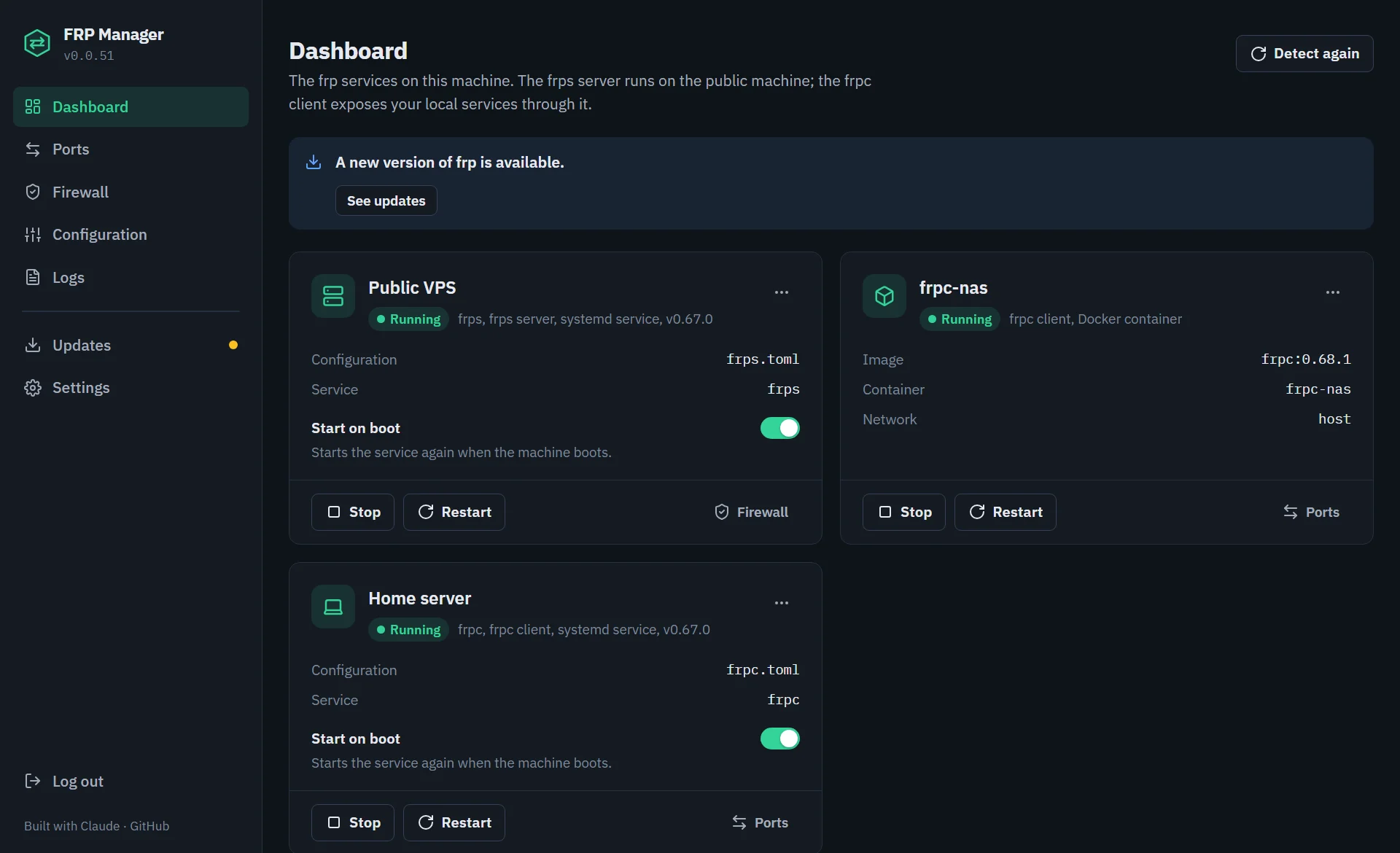
FRP Manager dashboard: an frps server, an frpc client and an frpc Docker container, all running

Everything frp needs, in one place

The panel finds your frp services on its own, systemd units and Docker containers alike, and keeps your configuration files as plain TOML.

Ports you can read

Every tunnel is listed as the path it opens, vps.example.net:25565 → 127.0.0.1:25565. The guided editor covers tcp, udp, http, https, stcp, xtcp and visitors, with PROXY protocol, encryption and compression. Settings it does not handle are kept as they are.

  • Changes pile up as a draft: save, or save and restart frpc
  • Each field shows its TOML key
  • A warning before stopping the frpc you are connected through
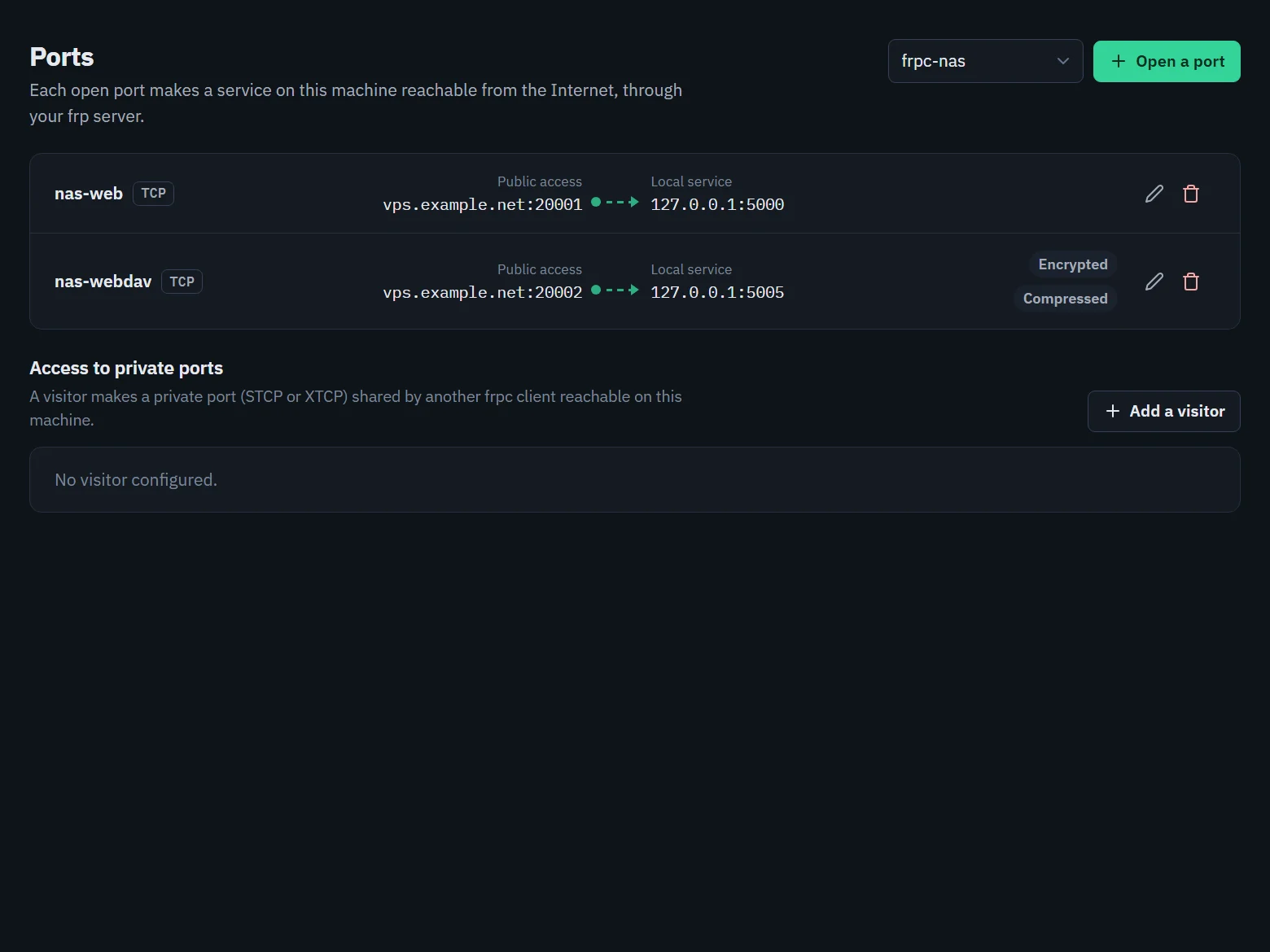
List of ports opened by frpc, each with its public and local address

A firewall for frps ports

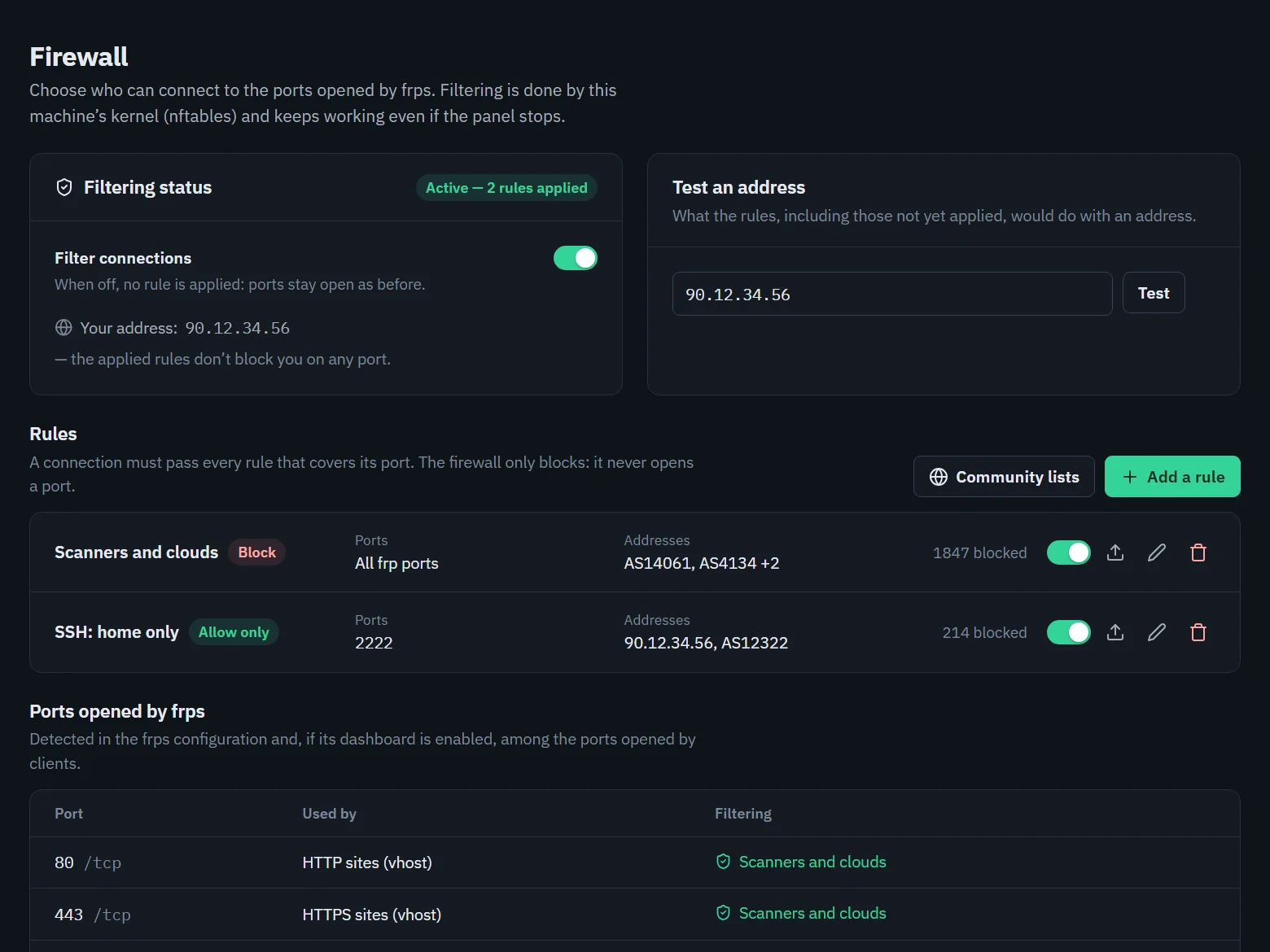
Decide who can connect to the ports frps opens: allow only, or block, by address, network or whole provider (AS number, prefixes fetched from RIPEstat). Rules are applied in the kernel with nftables, before Docker's NAT, and keep working if the panel stops.

  • Test an address before applying, with a warning if you would lock yourself out
  • Blocked connections in real time, with their provider
  • Community lists you can subscribe to, or publish
Firewall page with block and allow-only rules and the ports opened by frps

Live logs

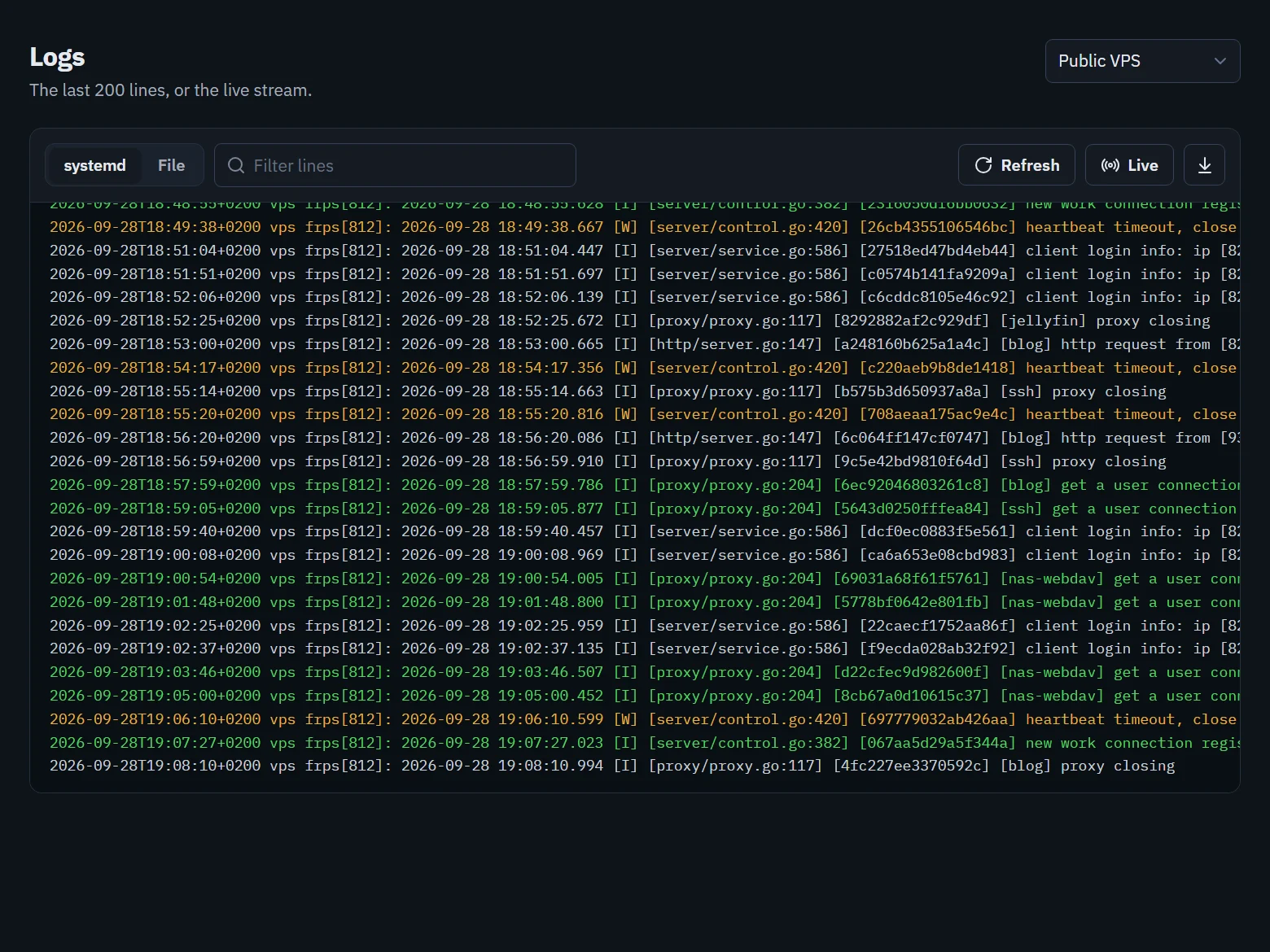
Follow the systemd journal, a log file or a Docker container as it is written, over WebSocket with an automatic fallback. Errors and warnings stand out, and a filter narrows the lines down.

  • Works through a reverse proxy
  • Containers with or without a TTY
Live frpc logs with errors and warnings highlighted

Automatic detection

frps and frpc services, binaries, configs and Docker containers, one card each.

Configuration forms

frps and frpc settings in sections; TOML is checked before it is written.

One-click updates

frp downloaded and checked against its published SHA-256; the panel updates itself.

Docker ready

Run the panel in a container and drive frp on the host, or manage frp containers.

Light and dark

Readable on desktop and mobile, in English and French.

Locked by default

Mandatory setup, argon2id passwords, CSRF protection, localhost only.

Try it before installing

The live demo runs the real interface with sample data. Everything can be clicked; nothing is actually changed, and it resets when you close the tab.

Open the demo in full screen

Get started

On the machine that runs frps or frpc. The panel installs frp for you if it is missing.

  1. Download the compose file and start the container

    curl -O https://raw.githubusercontent.com/Gogowwww/frp-manager/main/docker-compose.yml
    docker compose up -d
  2. Reach the panel through an SSH tunnel: it only listens on 127.0.0.1

    ssh -L 8765:127.0.0.1:8765 user@server
  3. Open https://127.0.0.1:8765 and create the administrator account

Opening the panel to your network, reverse proxy, configuration keys: installation guide.

Why a panel for frp

frp is a single binary configured by TOML files. Running it by hand works well; managing it day to day is where the time goes. FRP Manager keeps the same files and adds a layer on top.

Taskfrp by handWith FRP Manager
Add or change a tunnelEdit frpc.toml, restart frpcGuided form, TOML checked, save and restart in one click
See what is exposedRead the configsList of ports with their path, per client
Several frps or frpcOne unit and one file per instance to trackDetected automatically, one card each
Filter who reaches frpsWrite nftables or iptables rulesRules by IP, network or AS, tested before applying
Follow the logsjournalctl -fu frpc over SSHLive logs in the browser
Update frpDownload, check, replace the binaries, restartOne click, SHA-256 checked, services restarted

Removing the panel leaves frp running as before: your configuration stays plain TOML.

Built for a machine that faces the Internet

The panel controls exposed ports and runs as root, so it starts locked down.

No open panel

Until an administrator account exists, the initial setup page is the only thing it serves.

Strong passwords

Hashed with argon2id, 12 characters minimum, attempts limited per IP.

Localhost first

A new install listens on 127.0.0.1; opening it to the network is your call.

Hardened web layer

CSRF tokens, strict cookies, Content-Security-Policy, no clickjacking.

Checked downloads

frp archives and panel updates are verified against their published SHA-256.

No shell injection

Commands are argument lists, names are allow-listed, archives extracted safely.

Using Docker? The container uses pid: host and nsenter to drive systemd on the host: that is root-equivalent access to the host. What it implies.

Threat model and vulnerability reporting: security policy.

Questions

Does it replace frp?

No. FRP Manager drives the official frps and frpc binaries and reads and writes their usual TOML files. You can keep editing them by hand, and frp keeps running if you remove the panel.

Do I need to install frp first?

No. The install script downloads frps and frpc, creates their systemd services and leaves them stopped until you configure them. frp is then updated from the Updates page.

Does it work with frp running in Docker?

Yes. The panel detects frps and frpc containers through the Docker socket and can start, stop and restart them, read their logs and list their ports.

How do I reach the panel from another computer?

A new install only listens on 127.0.0.1. Use an SSH tunnel, a local reverse proxy (nginx, Caddy), or set the listening address to 0.0.0.0 in Settings and filter access by IP.

I lost my password.

Run python3 app.py --reset-password in the install directory (or through docker exec), then restart the panel.

Which languages are available?

English and French, messages from the server included. The panel follows your browser's language; you can change it in Settings, Preferences.

Take back your ports

Open the demo, or install it on the machine that runs frp.